 Cyclogram
Most machine cycle charts in the world are spreadsheets, and most of them are fine. This is about the other ones: the chart that will change thirty times before the machine ships, and what happens to it in Excel. The same station is drawn both ways, so you can see exactly where the spreadsheet starts to cost more than it saves.
The station. A bronze bush is pushed into position on a slide, clamped, drilled, released and blown clear. Four actuators, four movements, a three-second target. The numbers are those of the case study.
The spreadsheet version
Two layouts are common. The first is a grid: one row per actuator, one column per time slot, cells coloured where the actuator moves. Cyclogram's own Excel export uses exactly this layout, one cell per resolution step, because it is the form a customer can open anywhere. The second is a table with a bar chart: start and duration per movement, drawn as a stacked bar. Both start from the same table:
| Actuator | Waits for | Until it has | Stroke out | Dwell | Stroke back | Start | End |
|---|---|---|---|---|---|---|---|
| Move to position | — | — | 0.5 | 1.5 | 0.5 | 0.0 | 2.5 |
| Clamp | Move to position | arrived | 0.4 | 0.8 | 0.4 | 0.5 | 2.1 |
| Drill | Clamp | arrived | 0.3 | 0.5 | 0.3 | 0.9 | 2.0 |
| Eject | Move to position | finished | 0.2 | 0.1 | 0.2 | 2.5 | 3.0 |
With formulas for Start (the predecessor's arrival or end, plus an offset) and End (start plus the three parts), the cycle time is =MAX(End): 3.0 s. The free template is this table with the formulas written and a cell-per-0.1 s chart drawn from it. Up to here Excel is doing the job.
The Cyclogram version
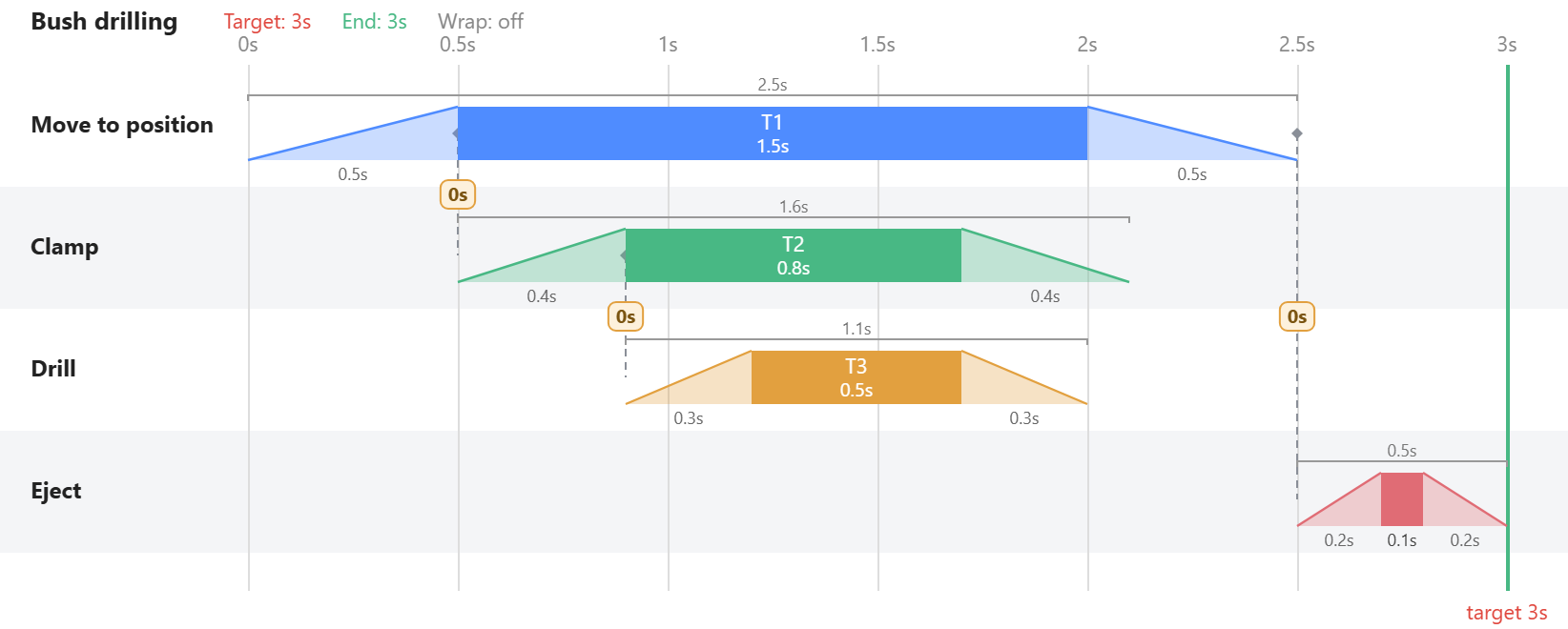
The same four movements, the same three dependencies. The difference is not the picture; it is what the picture knows. Each dashed connector is a binding stored in the model: the clamp's stroke start is bound to the slide's body start with an offset of 0 s. That one fact changes everything below.
Where Excel breaks
1. A changed stroke does not move anything downstream. Slow the clamp from 0.4 s to 0.6 s. In the spreadsheet, the drill's start only follows if you wrote the formula for it, and you wrote it for exactly one predecessor. In the editor, the drill, and everything bound to the drill, re-times itself while you drag. The case study runs three such changes and reads the cycle off each; in Excel each one is an audit.
2. A cell is on or off; a stroke is a slope. The clamp does not close when the slide's bar starts but when the slide has arrived, 0.5 s into it. In a grid that hook is a column you have to find by eye. In the editor a movement is a trapezoid with four hooks (stroke start, arrived, release, home) and a binding snaps to the one you mean.
3. Nothing stops an actuator being in two places. Paint a second movement of the clamp over the first and Excel paints it. The editor flags the overlap in red, and checks it across the cycle boundary when wrap is on.
4. The cycle boundary. A movement that starts at 2.8 s and lasts 0.5 s runs into the next cycle. In a grid you split it by hand into two pieces that must be kept in step for ever. The editor draws the wrap.
5. The cycle time is only as true as the last formula. =MAX(End) is right until someone types a number over a formula, which in a shared workbook is a matter of weeks. In the editor the cycle is derived; there is nothing to type over.
6. Reading it. A 60-column grid of coloured cells is honest but slow to read, and it has no connectors to say why a bar sits where it does and no target line unless you draw one. The chart above reads in a glance: what waits for what, and how far from the red line.
7. Reuse. The clamp you used last year is a block of cells in another workbook. In the editor it is an entry in the library, saved into a folder, dragged onto the next project with its strokes and its tags, so the next station starts from the one before.
Where Excel wins
Be fair to it. Excel is on every machine in the company and the customer's. It needs no sign-in. It takes formulas you write yourself, extra columns for cost or air consumption, a pivot table over twenty stations. For a station that will be drawn once, or a first pass on a napkin's worth of numbers, the spreadsheet is the right tool and the template is there for it. And when the chart is finished in the editor, Export → 📊 Excel gives the customer the grid they asked for, with the colours and the merged bars intact.
What Cyclogram will not do
It has no formulas of your own and no spare columns; it models one cycle, not a shift; it knows time, not geometry, so two movements that overlap in space are your job, with a simulation tool if the station deserves one. It is an editor for the chart, deliberately nothing more.
The rule of thumb
Count the changes. A chart that changes fewer than five times lives happily in Excel. A chart that changes every week until commissioning, and then once more when the customer asks for ten per cent, belongs in a tool where the dependencies are stored and the cycle time is derived. Cyclogram is free to try on your own station; the template is free to keep.