cyclogram
Motion profile terms
The words of step 1 — how far, how fast and how the move is shaped — each with what it means, its unit, what is typical, and a short animation. Try any of them in the calculator.
Linear or rotary axis Moving mass Load inertia Stroke Angle Move time Dwell Profile shape Ramp split Jerk time per ramp Orientation of travel Incline External force External torque Guide friction The motion chart
Linear or rotary axis
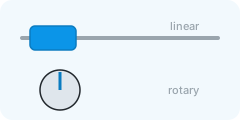
Whether the thing that moves travels along a line (a carriage) or turns through an angle (a table).
- Typical
- linear: a carriage on a screw, belt or rack; rotary: an indexing table, a turning shaft
It decides the words on every field below: a stroke in millimetres or an angle in degrees, a mass or an inertia.
Moving mass
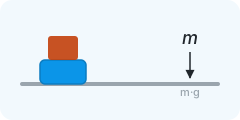
Everything the axis carries along: the carriage, the workpiece, the fixtures and the nut.
- Unit
- kg
- Typical
- 2 – 50 kg for a small axis, 100 – 500 kg for a machine table
Step 2 lets you list the parts one by one; this field is the first of them.
Load inertia
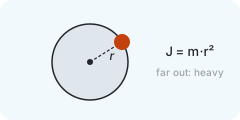
How hard the load is to spin up: its mass times the square of how far that mass sits from the axis.
- Unit
- kg·m²
- Typical
- 0.001 – 0.1 kg·m² for a small table, more for a loaded one
A solid disc has m·r²/2, a thin ring m·r². Step 2 can add it up from parts.
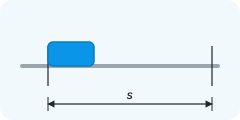
Stroke
How far the carriage travels in one move, from rest to rest.
- Unit
- mm
- Typical
- 50 – 1 000 mm
The stroke and the move time set the speed and the acceleration; everything downstream follows from those two numbers and the mass.
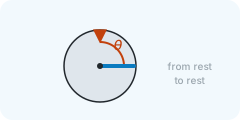
Angle
How far the table turns in one move, from rest to rest.
- Unit
- deg
- Typical
- 45 – 180° for an index, 360° for a full turn
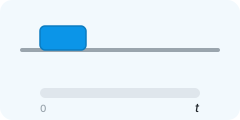
Move time
The time the move may take, from the first motion to standstill at the end.
- Unit
- s
- Typical
- 0.2 – 2 s
Shorter is harder: halving the time doubles the peak speed and quadruples the acceleration — and the torque with it.
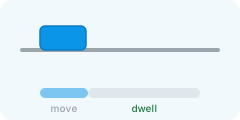
Dwell
How long the axis stands still at the end position before the next move — clamping, drilling, waiting.
- Unit
- s
- Typical
- 0.1 – 2 s
It costs no torque, but it is part of the cycle the motor heats up over: a longer dwell lowers the RMS torque.
Profile shape
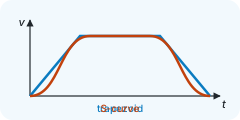
How the speed rises and falls: with sharp corners (trapezoid) or rounded ones (S-curve).
- Typical
- trapezoid for a first sizing; S-curve when the machine must run smoothly
The S-curve needs a higher peak acceleration for the same move time, but no sudden change of force — gentler on the structure, the belt and the workpiece.
Ramp split
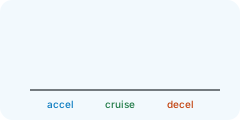
What share of the move time goes to accelerating, cruising and decelerating.
- Unit
- %
- Typical
- 33 / 33 / 33; 25 / 50 / 25 for a longer cruise
Equal thirds is the usual starting point. Shorter ramps mean a lower peak speed but a higher acceleration.
Jerk time per ramp
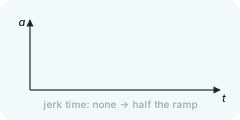
In an S-curve, the share of each ramp spent building the acceleration up or letting it fade out.
- Unit
- %
- Typical
- 25 – 50 %
At 50 % the acceleration never holds — the smoothest shape, with the highest peak. Near 0 % it is a trapezoid again.
Orientation of travel
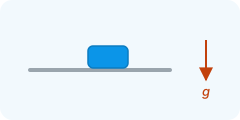
Whether the move runs flat, straight up, or up a slope — gravity works against the motor on anything but flat.
- Typical
- horizontal for a table, vertical for a lift axis
A vertical or inclined axis needs torque even at rest, and a brake for when the power is off.
Incline
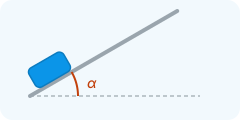
The angle of the travel above horizontal; the move goes up the slope.
- Unit
- deg
- Typical
- 15 – 60°
Gravity pulls with sin(angle) of the weight along the slope; the friction works on cos(angle) of it.
External force
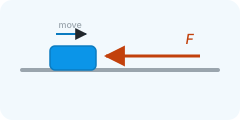
A force that pushes against the move: a spring, a cutting force, a cable chain, a seal.
- Unit
- N
- Typical
- 0 for a free move; 50 – 500 N for a process force
Enter it positive when it opposes the move. It adds to the torque in every phase, cruise included.
External torque
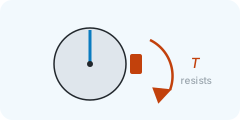
A torque that resists the turn: a process load, a brush, bearing drag, a cable.
- Unit
- N·m
- Typical
- 0 – 10 N·m
Positive when it opposes the move; it adds to the torque in every phase.
Guide friction
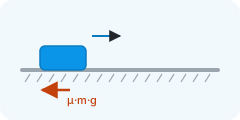
The friction coefficient of the guides the carriage runs on: the friction force is μ times the weight pressing on them.
- Typical
- 0.005 – 0.02 for rolling guides, 0.1 – 0.2 for sliding ones
Rolling guides are nearly free; dovetails and plain bushings are not. Seals and wipers add a little either way.
The motion chart
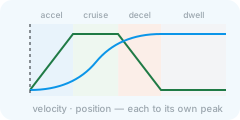
Position, velocity, acceleration, jerk and motor speed over one cycle, each curve scaled to its own peak so they share one plot; the chips under it switch them on and off.
- Typical
- position, velocity and acceleration on; jerk for an S-curve; the motor speed once the actuator is set
The shaded fields are the phases of the move: blue while the axis accelerates, green while it cruises at constant speed, orange while it decelerates, grey for the dwell at the end position. Hover the chart to read the values at a moment; the cursor otherwise follows the drawing's clock.